A good question I couldn’t answer
After I published my SteamOS couch gaming PC build, a commenter on r/sffpc asked a pointed question: how do I deal with CPU temps in the Ridge? Their experience was that a low-profile cooler in that case gets loud once load crosses 50%.
I didn’t have hard data at the time, which bugged me, because I absolutely should have. The whole point of running Node Exporter on this machine and scraping it with my self-hosted Prometheus + Grafana stack (described in the original post) is answering exactly this kind of question. So I pulled the numbers.
Initial findings
The numbers were worse than I expected. During a session of 007 First Light, the k10temp sensor on the Ryzen 5 7600 (under the Thermalright AXP90 X53) peaked at 93.1°C. Tjmax on this chip is 95°C. I was running two degrees from the ceiling.
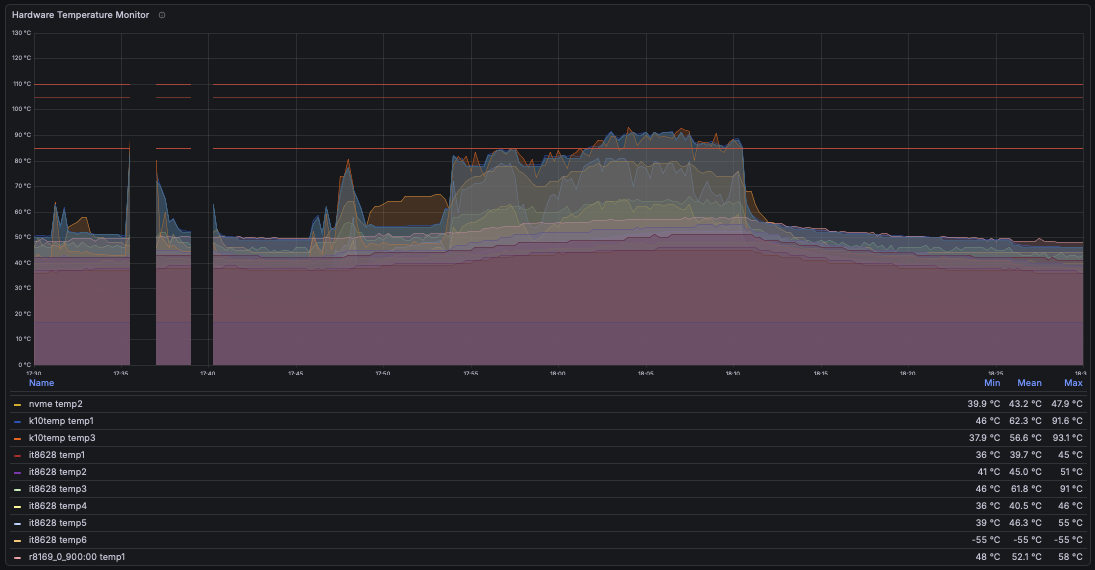
The surprising part is what CPU utilization looked like at that same timestamp: only around 40-44%, nowhere near full load.
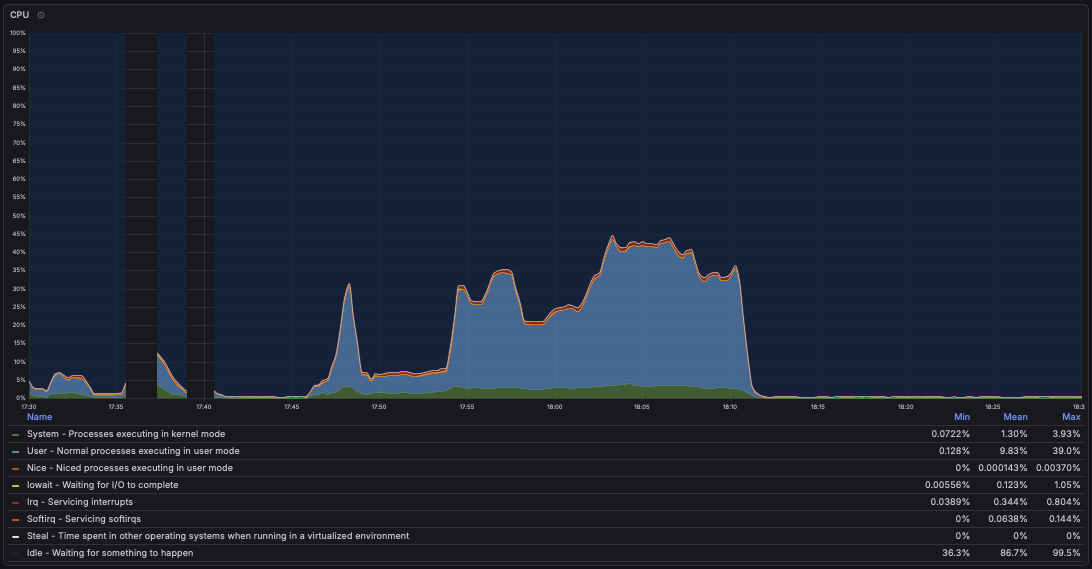
A chip hitting 93°C at 44% utilization isn’t a computation problem, it’s a cooling problem. The Ridge caps CPU cooler height at roughly 70mm, which rules out most meaningful aftermarket upgrades, and this isn’t just my build: another Ridge owner running a 7600X under the slightly larger Thermalright AXP120-X67 reports the same noise and heat behavior. The case is the constraint, not the cooler choice.
The fix (free, BIOS-only)
Before spending money on hardware that probably wouldn’t fit anyway, I tried two settings in the Gigabyte B850I Aorus Pro BIOS:
- Eco Mode: Enabled. This caps the CPU’s power draw. Less power in, less heat out. It’s a flat limit: the chip simply isn’t allowed to pull as many watts, regardless of temperature.
- PBO Enhancement: 70 Level 1. This one is the more interesting lever. Instead of capping power, it caps the thermal target the CPU boosts against. Precision Boost Overdrive normally lets the chip boost until it approaches Tjmax; this setting tells it to treat 70°C as the ceiling instead. The CPU still boosts opportunistically, it just stops pushing when it gets warm rather than when it gets hot.
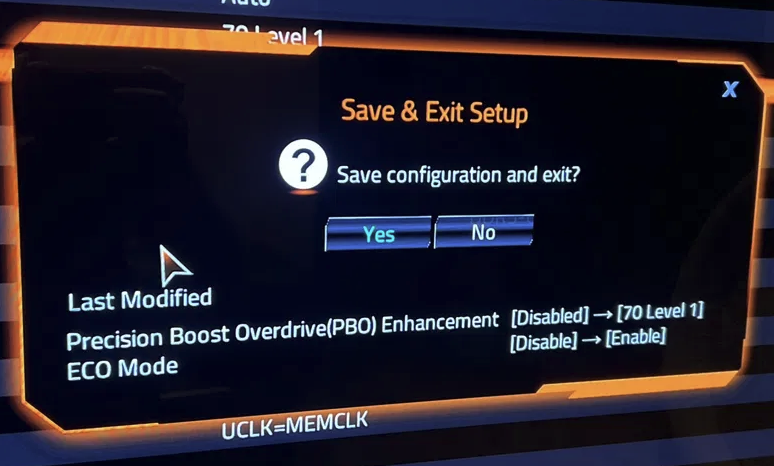
The distinction matters. A flat power cap alone limits heat generation but doesn’t know anything about your cooling. A temperature-target limit adapts to what the cooler can actually dissipate, which is exactly what you want in a thermally constrained case like the Ridge.
Results
The immediate retest in the same game showed the CPU settling around 71°C. Encouraging, but a single short session doesn’t prove much, so I followed up with a sustained session of roughly four hours.
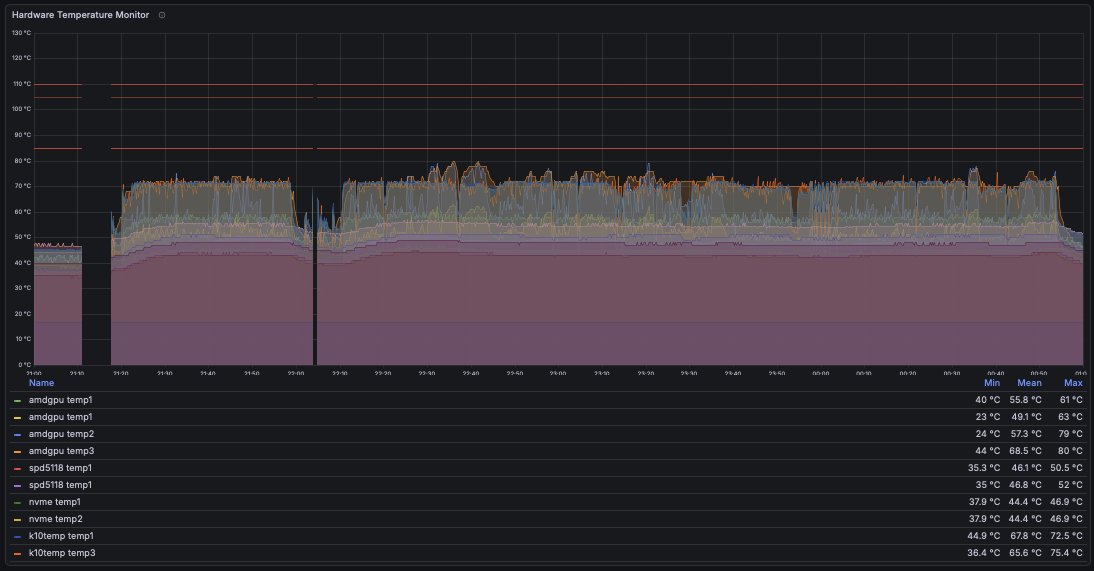
The CPU held in the high-60s to mid-70s the entire time, with a max of 75.4°C. And here’s the part that convinced me the fix is real: this longer session ran at higher CPU utilization than the original 93°C session, hitting 50-70%.
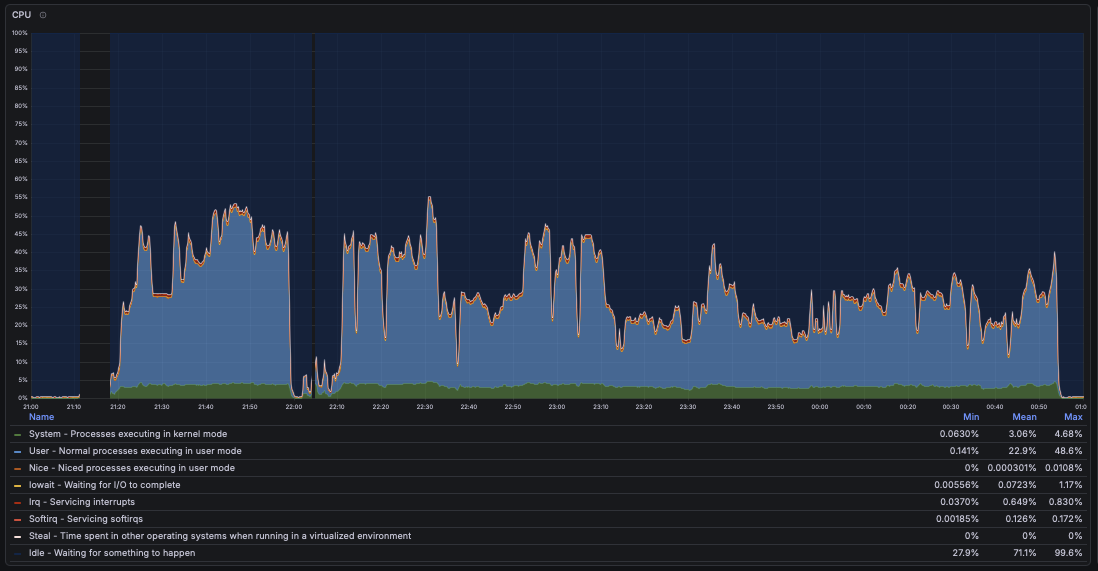
So the fix held up under a tougher load than the one that originally sent the chip to 93°C, not an easier one. Roughly a 20°C drop in sustained temps, and through all of this testing I noticed no drop in game performance or feel. The Ryzen 5 7600 has more headroom than this workload needs, so trading a slice of boost aggression for thermals costs nothing I can perceive from the couch.
If you’re in the same boat
If you’re running a low-profile cooler in a Fractal Ridge (or any similarly tight SFF case) and watching your CPU flirt with Tjmax, try the BIOS route before buying a new cooler: enable Eco Mode, and set a temperature-target boost limit like PBO Enhancement’s 70°C mode. In my case that combination dropped sustained gaming temps by about 20 degrees, held up over hours under heavier load, and cost exactly nothing.
And if you’re not already graphing your hardware with something like Prometheus and Grafana, this is the argument for it. I went from “I think it’s fine?” to a diagnosed problem, a targeted fix, and before/after proof, all from data the machine was already collecting.